
Skip to content
Voxbi Cockpit APIs
API Guides

Queues

A queue holds inbound callers in a virtual line and offers each call to your team by rules you set: who rings, in what order, for how long. Reach for one when more callers can arrive than there are people free to answer.

Overview

Use a queue when more callers can arrive than people are free to answer. Calls usually enter a queue from a call flow's Enter queue step. The settings here are stored configuration: the actual ringing, timing, and routing happen on the telephony platform at call time.

Membership is the union of five pickers (Users, Pickup lines, Groups, Pools, Statuses). Statuses is the exception: it filters the other sources rather than adding members of its own.
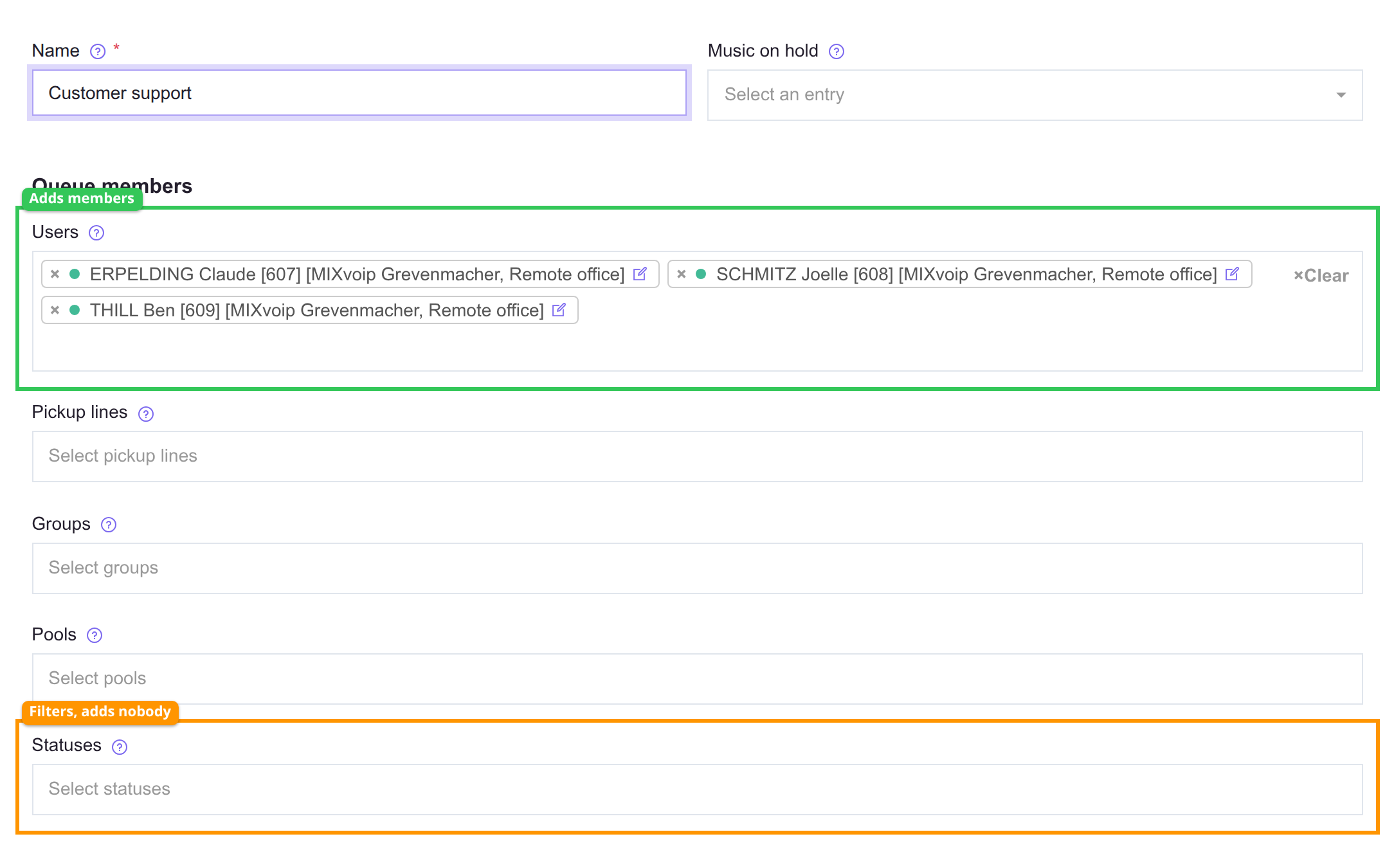
The queue members section, with the Users picker and the Statuses picker highlighted
Outline Picker What it does
Green Users, Pickup lines, Groups, Pools Each one adds members.
Orange Statuses Filters the pickers above. On its own it adds nobody.

What you configure

The ring strategy is a choice you set, and the platform decides who rings based on it:

Strategy Intent
Ring all Offer the call to every available member at once. Best for small teams.
Round robin Offer to members one at a time, cycling in order.
Fewest calls Favor the member who has answered the fewest calls. Balances workload.
Least recent Favor whoever has been idle longest.
Random Pick an available member at random.

How to stand up a queue

  1. Decide how members are selected. Users for a fixed list, Groups or Pools when the roster should track the team as it changes. The pickers add together, with one exception: Statuses filters the others rather than adding anybody, so a queue with only Statuses set has no members at all.
  2. Create the queue, add the members, and pick a ring strategy from the table above.
  3. Set the fallback call flow before you finish. Timeouts, the exit key, and an empty queue all send the caller there, and without one those callers have nowhere to go.
  4. Set the ring duration and retry delay, then decide whether an empty queue holds calls (Ring empty queue on) or drops them to the fallback immediately.
  5. Route calls in by adding an Enter queue step to the call flow that answers the number.
  6. Test it twice: once staffed, and once with every member unavailable. The second test is the one that exercises the fallback, and the one people otherwise discover in production.

See also

  • Call flows - route incoming calls into a queue via an Enter queue step, and handle calls that exit it.
  • Groups and Pools - the dynamic member-list sources.
  • Music on hold - the audio callers hear while waiting.
  • Pickup lines - shared line appearances that can be queue members.

Form fields

Fields available in the create and edit forms.

General

Name

Identifies the queue in lists and call-flow steps. No effect on routing.

Music on hold

Audio callers hear while they wait. Only sound files of type Music are available.

Users

Specific named users who ring as queue members.

Pickup lines

Shared line appearances (BLF-monitored) added as members.

Groups

Adds every user in the selected groups as members.

Pools

Adds users that dynamically match a pool definition (tag, location, language).

Statuses

Filter: only members whose Tempus status matches receive calls. Pair with Users, Groups, or Pools.

Ring strategy

How incoming calls are shared among queue members.

  • ring_all Ring all Every available member rings at once, first to answer wins. Best for small teams.
  • round_robin Round robin Members ring one at a time, cycling in order. Fair, but slowest pick-up.
  • fewest_calls Fewest calls The member with the fewest answered calls rings first. Balances workload.
  • least_recent Least recent Whoever has been idle longest rings first. Smooth across long shifts.
  • random Random A random available member each attempt.
Queue priority

When a member belongs to several queues, the lowest number is offered first.

More detail

Example: a user in a VIP queue (priority 1) and a General queue (priority 5) gets VIP calls first. General calls reach them only when the VIP queue is empty. Leave default when members belong to one queue.

Busy members

When on, rings members already on a call (needs call waiting). Usually off.

Twinnings

When on, also rings each member's configured mobile twinning. For field workers reachable on mobile.

Ring empty queue

When on, calls wait even with no members available. When off, they drop to the fallback flow immediately.

Ring duration

How long one member rings before the queue tries the next. Unlimited rings until answered or hang-up.

Retry delay

Pause between attempts, so members are not hammered with rapid-fire rings.

Wrap up time

How long a member is held out of rotation after a call, to finish notes.

Exit key

DTMF digit a waiting caller presses to leave the queue and follow the fallback flow (0 is conventional).

Call flow

Fallback flow for calls that exit the queue (timeout, exit key, or no members). Always set one.

Announce caller position

When on, waiting callers hear their position in the queue.

Frequency

How often, in seconds, the position is announced to waiting callers.

Language

The language used for the position announcement.

Users

The users who answer calls to this queue.

Updated