
A caller identity sets the number shown to the person being called when a user dials out. Identities live at four levels (PBX, group, user, and SIP device) and the most specific one wins.
Overview
Caller identities are configured as sub-records on a PBX, group, user, or SIP device. When a call goes out, the system resolves which identity to use by walking a hierarchy: SIP device takes precedence over user, user over group, and group over the PBX default. The most specific match wins.
What it does
The extension suffix lets you append digits to the base phone number, forming a direct dial number (DDI). Using * as the suffix automatically inserts the user's own extension, so multiple users can share one base number while each presenting their own direct line. Where more than one identity sits at the same level, the move-up and move-down buttons beside each row set which takes priority.
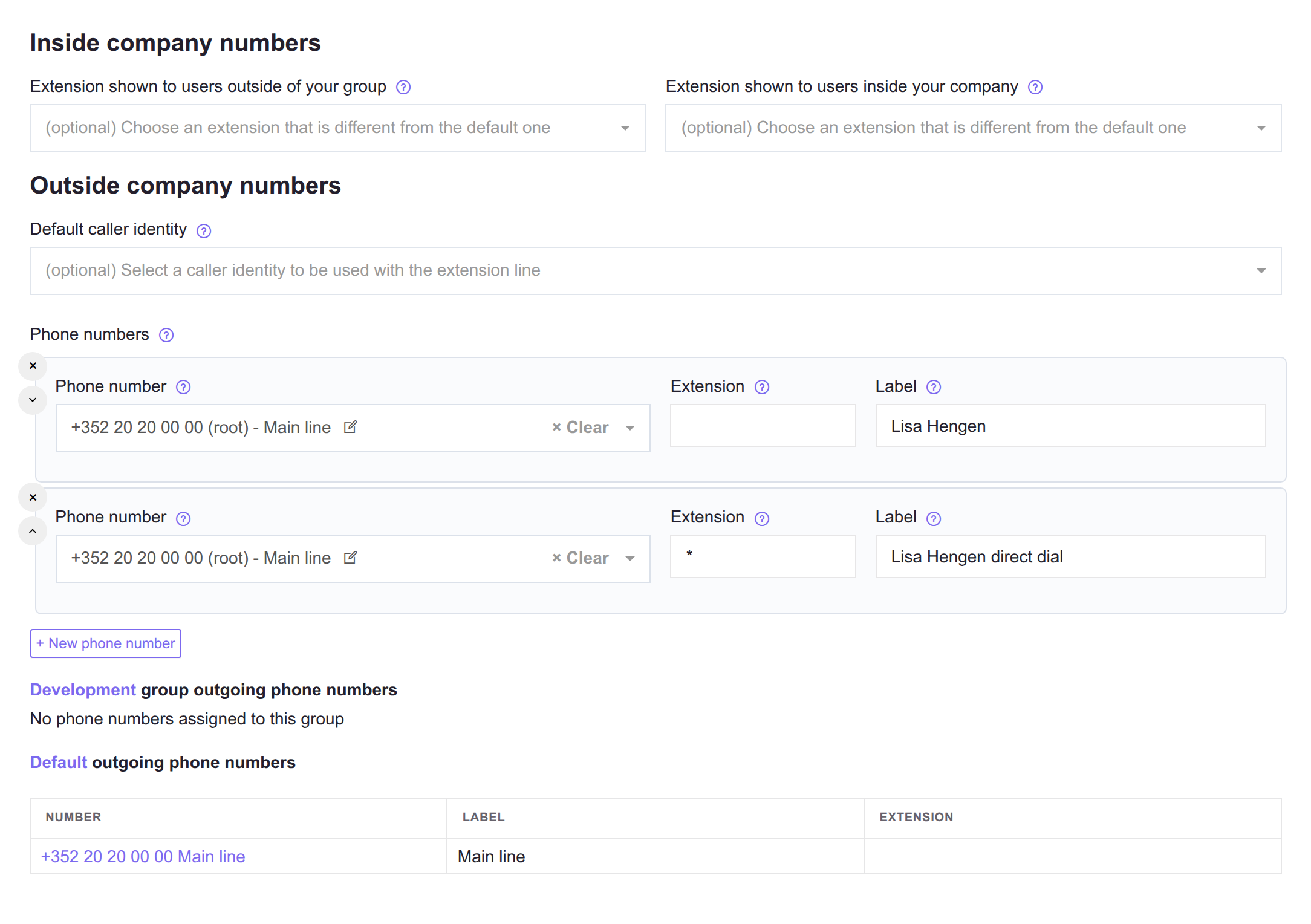
The same page shows the group and PBX defaults underneath, so you can see what this user's own identities are overriding.
How to fix the number shown on outbound calls
- Find the level that is winning. Resolution walks SIP device, then user, then group, then the PBX default, and the most specific match wins. If a user has their own identity, editing the group or PBX default changes nothing for them.
- Add or edit the identity at the level you actually want to control, picking a phone number already assigned to this PBX.
- To give a whole team direct lines from one base number, set the extension suffix to
*, which inserts each user's own extension. - Where several identities sit at the same level, use the move-up and move-down buttons beside each row to set which one takes priority.
- Check the number's Assignations tab as well. Presenting a number on an outbound call also requires the user, group, or device to be listed there, so an identity alone is not always enough.
See also
- Phone numbers - the numbers available to assign as caller identities.
- SIP devices - device-level caller identity assignment.
- Users - user-level caller identity assignment.