
An approval chain answers one question: when this person raises this kind of request, who is asked, in what order, and how many of them have to say yes. A chain is three things - who it covers, an ordered list of steps, and a list of watchers.
Overview
Chains route absence requests, home office requests, time point corrections, and schedule assignment requests. Each type is routed separately, so the same person can be handled by one chain for absences and another for home office.
Requests are never approved automatically. One that reaches nobody stays pending until an administrator decides it, which is what the coverage report is for.
How a request finds its chain
Exactly one chain decides a request, and its steps are the whole ladder. The winner is picked in two moves, in this order:
- Which chains staff this request type at all. A chain with nobody set for home office is not a home office chain, and does not compete for one.
- Of those, the one that names the person most specifically: employee, then department, then company, then all employees.
Because the type is checked first, a chain can be the most specific chain a person has and still not decide their request:
| Situation | What happens |
|---|---|
| A chain names Alina for absences only. Her department chain covers home office. | Absences go to the chain naming her, home office to the department chain. |
| A chain names Alina for absences. Another names her for home office. | Each decides its own type, and both are valid. |
Department and company are read from the employee's active contract. Somebody with no active contract can only be reached by a chain that names them directly or covers all employees.
Steps
Steps are asked in order, and a step waits until the one above it has approved. A request freezes its chain when it is created, so editing a chain changes where new requests go, not the ones already in flight.
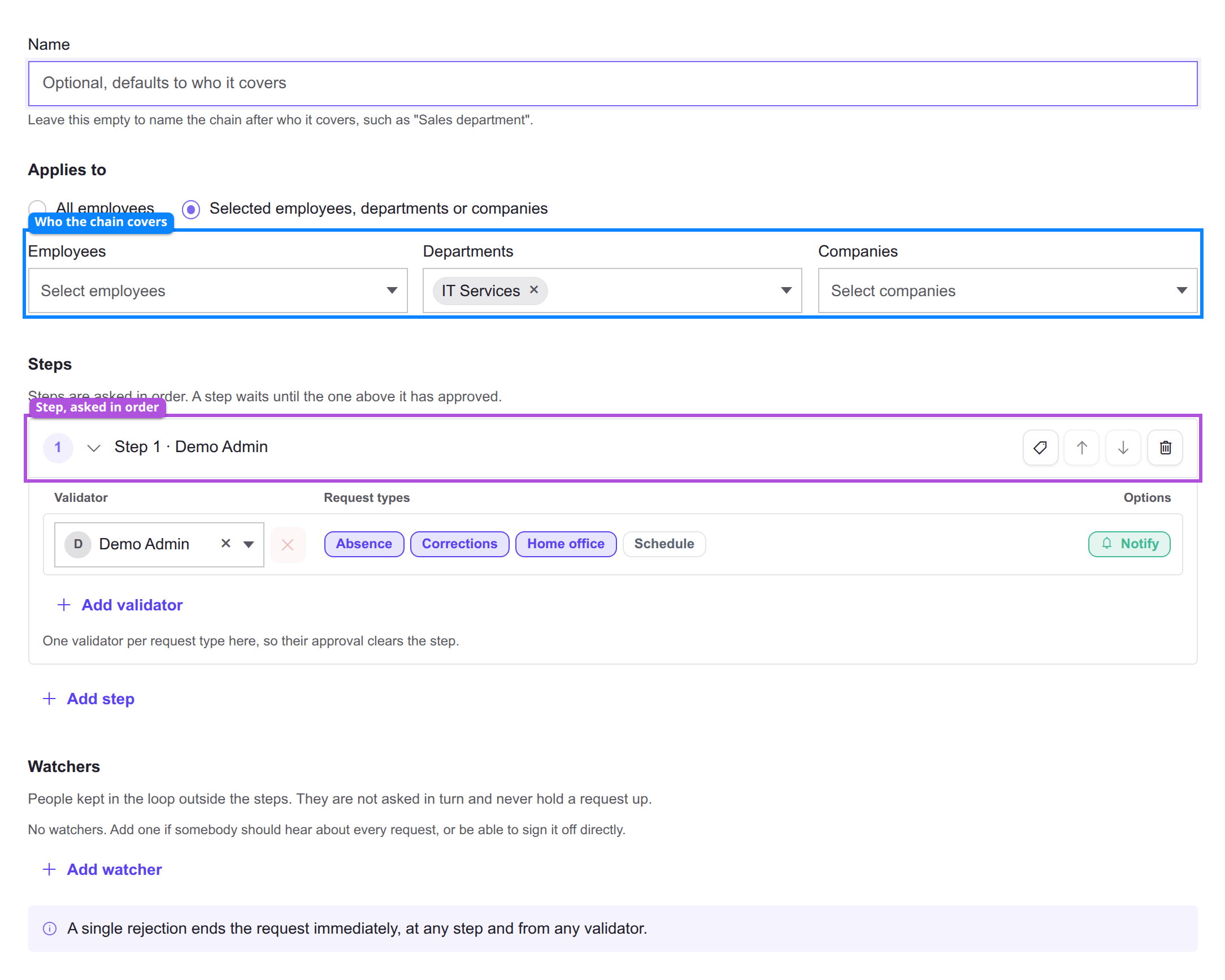
| Outline | Section | What it sets |
|---|---|---|
| Blue | Applies to | Who the chain covers: employees, departments, or companies. |
| Purple | Step | One rung of the ladder. Reorder with the arrows on the right. |
Each step needs a number of approvals, set per request type:
- All validators - everyone on the step who covers that type has to approve.
- Any N - the first N to answer settle the step.
Always required on a validator means two things at once: they count toward the number, and they must be among the approvers. The step stays open until they answer, even once the number is reached.
A step nobody staffs for a request type waits for nobody. It does not exist for that type, and the request goes straight to the next step. The editor warns you when a step has this hole.
Watchers
A watcher is not a step: they are never asked in turn and never hold a request up. Each carries two switches:
- Notify - emailed once when the request is created, not again at each step.
- Can decide - may approve or reject the whole request at any moment, without waiting for the steps.
A watcher with neither switch on does nothing, so the editor will not save one.
A chain of watchers alone is a real configuration, as long as one of them can decide: nobody is asked in turn, and whoever holds that power settles it when they look.
Self-approval
By default nobody signs off their own request. The person raising it is left out of their own chain, and a step they were the only member of disappears with them - which shows up in coverage as a gap on their own row.
The tenant-wide self-approval list changes that for the people on it, per request type: they stay on their own chain and their approval counts like any other. It is edited from the chains list, not inside a chain.
Coverage
Coverage sweeps every employee against every request type and says where each request would go. It is the only place the quiet failure shows: a request that reaches nobody does not error.
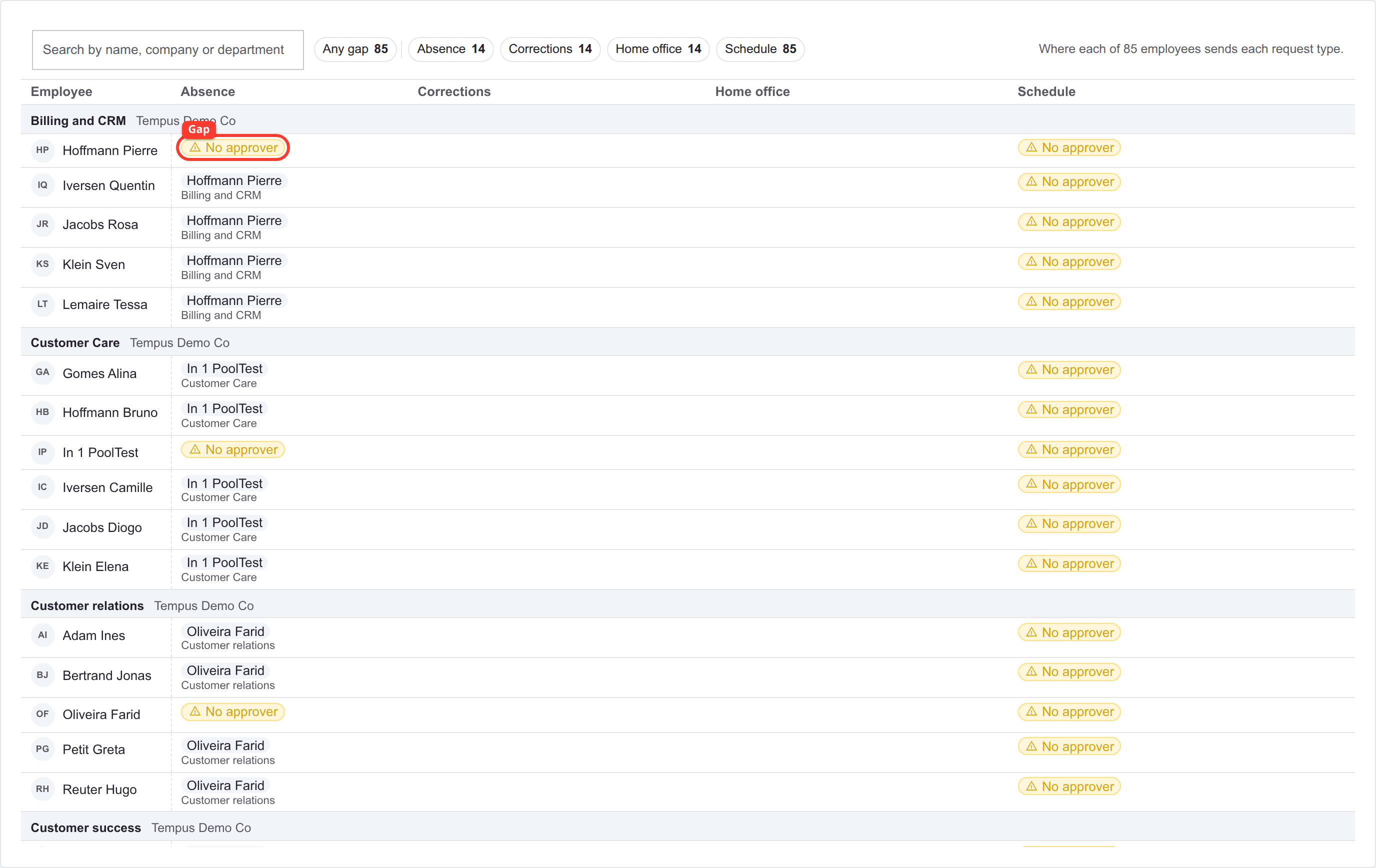
| Outline | Cell | Meaning |
|---|---|---|
| Red | No approver | Nobody would be asked. Hover it to see which of the two causes applies. |
The chips along the top count the gaps per request type, so a chain that staffs absences but not corrections shows up before you read a single row.
- No approver marks a gap. Its hover says whether a chain reaches them with nobody left to ask, or whether no chain reaches them at all - two different fixes.
- Personal marks a chain that names the employee individually.
- Chains that route nobody are listed under the table. A chain whose every subject is claimed by a more specific chain is inert, and the table shows only winners.
What the editor will not save
- A chain covering nobody: pick all employees, or at least one target, and not both.
- A step with no validator, or a validator or watcher covering no request type.
- A chain with no steps and no watcher who can decide, since nothing could reach a decision.
- Two chains covering the same target for the same request type. For different types it is fine.
- A number of approvals above the validators covering that type, or below the always-required ones.
How to set up approval routing and prove it works
- Decide the population first. Remember that a chain naming somebody individually replaces the department and company chains for the types it staffs, rather than adding to them.
- Add the steps in the order they should be asked, setting the number of approvals per request type on each one.
- Put oversight people in watchers, not on a step. A watcher never holds a request up, and only decides if you give them Can decide.
- Set the tenant-wide self-approval list from the chains list if some people must sign off their own requests. By default the requester is left out of their own chain, which can empty a step they were the only member of.
- Open coverage before trusting any of it. This is the only place the quiet failure shows, because a request that reaches nobody does not error. No approver has two different causes with two different fixes, and the hover tells you which.
- Read the list of chains that route nobody, underneath the table. A chain whose every subject is claimed by a more specific chain is inert.
- Raise one test request per type you configured. Each type routes separately, so a chain can staff one type and quietly not staff another.
Approval chains replace validators and managers, where several rules each contributed validators to one merged ladder and the quorum depended on which rule was read first.